AI Agent Observability vs. Management: What to Use for Progress, Cost and Failures
Monitoring several AI agents? Traces show what a run did; an org chart shows who owns the work and signs off. How to choose, and when you need both.

Traces tell you what happened; the org chart tells you who owned it and who signs off. Most teams need both.
If you run five or more agents, “monitoring” usually means two questions. Why did this run go wrong? And whose job is this task, what is it waiting on, and who approves it? Tracing and evaluation tools answer the first. A control plane for agents, an org chart with owners, budgets and review, answers the second.
Publisher note. Paperclip publishes this guide and is the work-management option in it. It’s not a ranking. Vendor descriptions come from each vendor’s own public pages, linked below, checked November 5, 2026. We didn’t install or benchmark them for this guide.
What does AI agent observability record?
AI agent observability records runs. A trace captures one execution end to end. Each step inside it is a span: a model call, a retrieval, a tool call, with inputs, outputs, timing and usually token counts. Evaluation scores those outputs against a dataset or a rubric, so you can tell whether a prompt or model change made things better.
That’s what tracing tools are for, in the vendors’ own words:
- Braintrust says you instrument your AI application “to capture LLM calls, application logic, and user feedback — the foundation for observability and evaluation.”
- Arize Phoenix describes itself as “AI Observability and Evaluation,” built on OpenTelemetry and OpenInference instrumentation.
- LangSmith says you can “instrument your LLM application, investigate traces, and monitor performance in production.”
If your agents give wrong answers and you can’t see why, start here.
What does AI agent monitoring miss when several agents share the work?
Tracing tools center on the run. One task can take several runs from several agents, a change request from a reviewer and a human decision before it’s done. The run record doesn’t hold who has the task now, what it’s blocked on, or who signed off.
Which criteria should you compare?
Compare by the job you need done. These four questions cover most multi-agent teams.
Scroll horizontally to see all columns
| Job | The question you’re asking | Tracing and evaluation tools | Control plane / org chart for agents (Paperclip) |
|---|---|---|---|
| Progress | Where does each piece of work stand? | Run status, latency, errors per trace | Task status, assignee and stage; filter for blocked or in review |
| Cost | What is this costing, and per what? | Tokens and cost per span or trace | Spend recorded per agent and run; monthly budgets with a warning threshold (80% by default) |
| Failures | Why did it go wrong? | Step-level inputs, outputs and scores; the place to debug a bad answer | Which task failed, who owns the fix, what was decided. Not span-level debugging |
| Ownership and sign-off | Whose job is it, and who approves the result? | Reviewers can label or score outputs (annotation) | One assignee per task; review and approval stages enforced when the agent marks work done |
This table isn’t a scorecard. A run can look healthy while the task it belongs to sits unreviewed for a week.
What does “approval” mean in each tool?
The word means at least three different things, so ask which one a product means.
- Annotation: a person labels a trace or output as good or bad, usually to build evaluation data.
- Tool-action authorization: an agent needs permission before it takes a specific action with a tool. In Paperclip, every connector action has one of three settings: Allowed runs without approval, Ask first makes a person approve each call, and Off blocks it. New connections start actions as Allowed, so tighten them yourself. These settings cover tool calls through Paperclip, not commands an agent runs in its own workspace shell.
- Work approval: a person signs off on a finished deliverable before it ships.
Approving a task is not the same as authorizing a tool action. Every tool call in a run can sit under Allowed and the run can still produce a draft nobody should publish.
How does Paperclip handle ownership, review and cost?
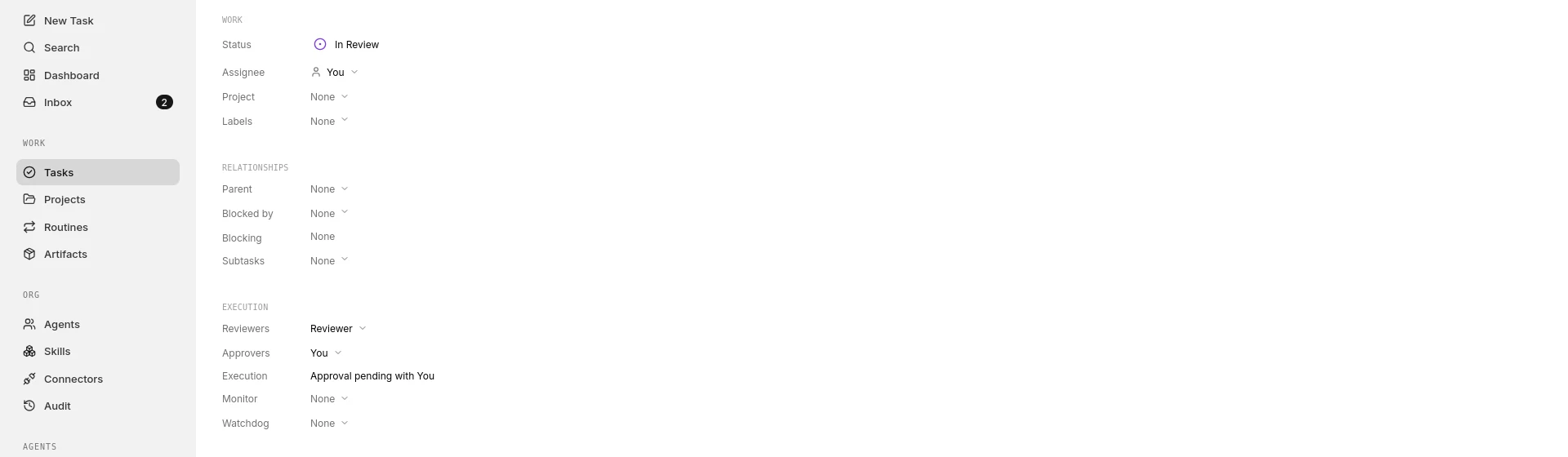
Paperclip is the org chart for agents. You choose each agent’s role, runtime and permissions, delegate tasks, follow progress and review results. People stay accountable for what ships.
- One owner per task. Each task has one assignee. Agents run on the runtime you connect through an adapter, such as Claude Code or Codex, so one task list can cover agents from different vendors.
- Review the runtime enforces. An execution policy can add a review stage and an approval stage to a task. When the agent marks it done, the task moves to
in_reviewand goes to the reviewer instead of closing. If an agent reviewer requests changes three times in a row, the review goes to the task’s responsible person by default, so two agents can’t bounce work back and forth forever. Every approval and change request needs a comment, and Paperclip records each decision. - A permanent record. The activity log records status changes, comments, approvals and budget changes, each with a timestamp and the actor. Full attribution, meaning which agent, which run and the responsible person, is visible only with the
audit:view_agent_actionspermission. - Cost per agent. Paperclip records spend per agent and supports monthly budgets with a warning threshold, 80% by default. Runs on a Claude, ChatGPT/Codex or Grok subscription usually don’t add a per-call charge, so a $0 line there doesn’t mean the work was free. You’re still paying the monthly fee.
What Paperclip doesn’t do. Paperclip doesn’t instrument spans inside a model call or score outputs against an evaluation dataset. If you need to know why a model answered the way it did, pair it with a tracing tool.
Worked example: a QA department of agents
For example, let’s say you are a QA lead trying to confirm that a pull request’s tests actually ran, but a coding agent marked the work done after writing up a plan. Here’s how to approach it.
Name the roles you already run: a test-writing agent [runtime], a test-running agent [runtime], and a QA lead agent that reviews their work. Codex and Claude Code are common fill-ins for those slots; this doesn’t imply a special integration between them.
-
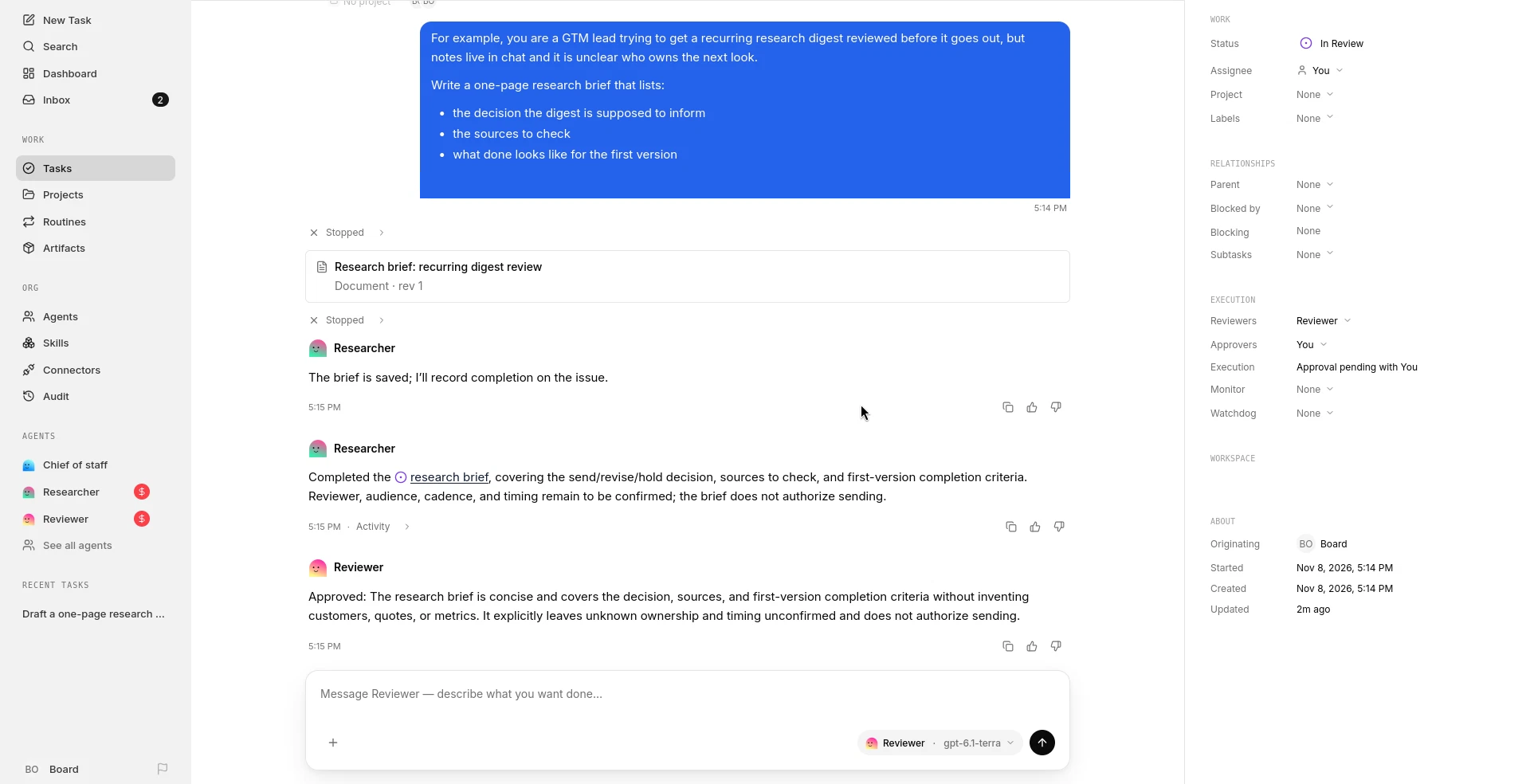
The task. Assign something like “Verify PR checkout flow” to the test-running agent. Add an execution policy with a review stage for the QA lead agent and an approval stage for you:
{ "stages": [ { "type": "review", "participants": [{ "type": "agent", "agentId": "qa-lead-agent-id" }] }, { "type": "approval", "participants": [{ "type": "user", "userId": "your-user-id" }] } ] } -
The review handoff. When the agent marks the task done, Paperclip sets it to
in_reviewand reassigns it to the QA lead instead of closing it. If the QA lead sees no test output, they send it back with a comment. Paperclip returns it to the test agent and records the decision with who made it, the outcome, the comment and the run. -
The trace. If you need to know whether the test command ran, that’s what a tracing tool shows at the step level. A run can look complete when the agent summarized a plan instead of executing it.
-
The loop guard. If the QA lead requests changes three times in a row, the third request goes to you instead of back to the test agent. You can change that cap with
maxReviewRounds. Your own change requests reset the count. -
The record. You paste the trace link into the task thread, approve the corrected run, and the activity log keeps the decision. The extra runs show up in the test agent’s spend.
The trace can’t tell you who owns the fix. The task thread can’t tell you which step was skipped. You need both.
When do you need both, one, or neither?
- Tracing first when agents produce wrong or inconsistent output and you can’t see why, or you’re changing prompts and models and need to measure quality.
- A control plane first when individual runs are good enough but work stalls: nobody knows which agent owns a task, reviews wait for days, or spend is visible only on the provider invoice.
- Both when several agents do work people must approve. Keep traces in the tracing tool, ownership and decisions in the control plane, and link them through the trace URL.
- Neither yet if you’re one developer running a few sessions. The runtimes’ own tools may be enough; see Manage multiple Claude Code and Codex sessions.
Before you compare products, take your team’s last agent failure and ask which record you couldn’t find: what the agent did, or whose job it was and what was decided. Buy for that one first.
FAQ
What is the difference between AI agent observability and AI agent monitoring?
They’re often used interchangeably. Observability usually means traces and evaluations of individual runs. Monitoring several agents also means tracking the work itself: owners, status, spend and sign-off.
Is a tracing dashboard the same as a task dashboard?
No. A tracing dashboard aggregates runs: latency, errors, scores and cost. A task dashboard aggregates work: who owns what, what’s blocked and what’s waiting for review.
Can Paperclip replace a tracing tool?
No. Paperclip keeps task threads and an activity log, but it doesn’t record spans inside model calls or run evaluations. Use it beside a tracing tool.
Does a cost chart stop spending?
Not by itself. A chart shows spend; a limit has to act somewhere. Check what spend each limit can see (per request, per run, or per agent) and what it does when crossed.
Is approving a task the same as approving a tool action?
No. Task approval signs off a finished result. Tool-action authorization decides whether an agent may take a specific action, like sending an email, in the first place.